Docker Compose
Atfinity can run on a multi VM setup. While the setup is battle-tested and used by a few clients, we recommend, whenever possible, to use our Kubernetes Setup to deploy Atfinity on your infrastructure.
Note: All necessary files and credentials are available via your dedicated support agent
Overview
Atfinity can be deployed as either a one, two, or three tier architecture, optionally with the End User Wizard (EUW):
| Mode | Servers | Description |
|---|---|---|
| 1-Tier | CORE | Backend, Frontend, Database, and File Storage all run on one server |
| 2-Tier | CORE + DATA | Backend and Frontend on CORE; Database and File Storage on DATA |
| 3-Tier | CORE + WEB + DATA | Backend on CORE; Frontend on WEB; Database and File Storage on DATA |
| X-Tier + EUW | Any of the above + EUW | Adds the End User Wizard (EUW) on a separate server to any tier setup |
The EUW is always deployed on a separate server as it is typically the most exposed component.
The following diagram gives an idea how a system could be configured and how the components communicate. Contact us for more precise diagrams and advice to your specific situation:
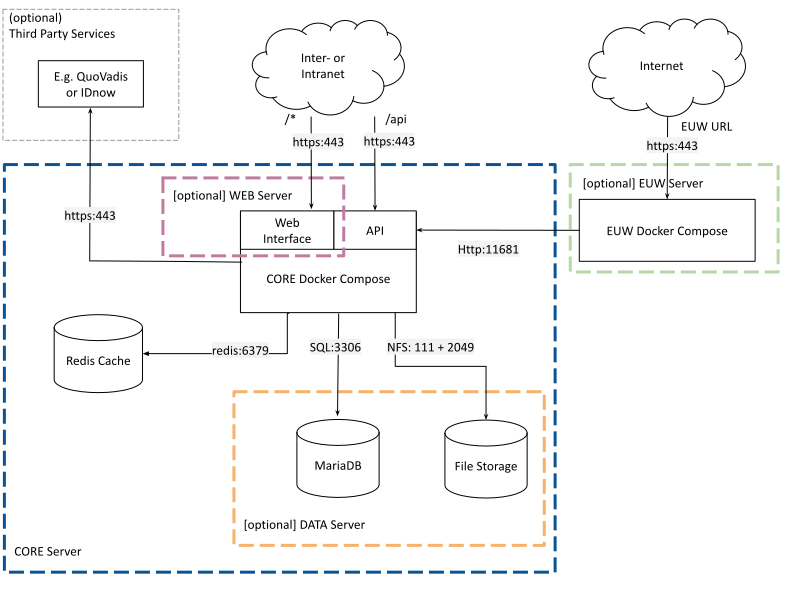
Required setup
The Atfinity backend is available as a collection of Docker containers and Docker Compose files binding these together. There are separate Docker Compose files for the CORE server, the WEB server (3-tier), and the EUW server.
Required Services
Atfinity services will communicate with a MariaDB database and an NFS file storage to permanently store data. In addition, Atfinity uses an ephemeral Redis to cache certain data for a short period of time. This means, you will have to install and provide the following services:
CORE Server
- Docker (>=24.0.6)
- Docker Compose (>=2.22.0)
WEB Server (3-tier only)
- Docker (>=24.0.6)
- Docker Compose (>=2.22.0)
- Static private IP reachable from CORE
EUW Server (X-Tier + EUW)
- Docker (>=24.0.6)
- Docker Compose (>=2.22.0)
- Publicly reachable (end users access the EUW directly)
DATA Server
- MariaDB (>=10.6)
- NFS File Storage
For performance, it is critical to make sure these servers have enough resources to run the required services and the application.
Firewalls
Atfinity is able to handle various firewalls between the components. It is critical though, that transport between the tiers is possible and of good performance. The above diagram and the respective documentations of used tools, gives an overview of needed ports.
Approximate Port Map (Adapt for your circumstances)
| Source | Destination | Port | Required For | Purpose |
|---|---|---|---|---|
| CORE | DATA | 3306/tcp | 2-tier, 3-tier | MariaDB |
| CORE | DATA | 111+2049/tcp+udp | 2-tier, 3-tier | NFS media storage |
| CORE | WEB | 8443/tcp | 3-tier | Internal HTTPS proxy from CORE to WEB |
| EUW | CORE | 443/tcp | X-Tier + EUW | EUW server-side requests to the API |
| Users | CORE | 443/tcp | all modes | Public HTTPS ingress |
| Users | CORE | 80/tcp | all modes | HTTP->HTTPS redirect / Let's Encrypt |
| Users | EUW | 443/tcp | X-Tier + EUW | Public HTTPS ingress for the wizard |
| Entra ID | CORE | 443/tcp | SCIM | Entra ID provisioning users |
We are happy to assist you, but since the spectrum of firewalls and other tools is huge, ultimately it’s within the clients responsibility to make sure tiers are configured correctly.